


About the Venue
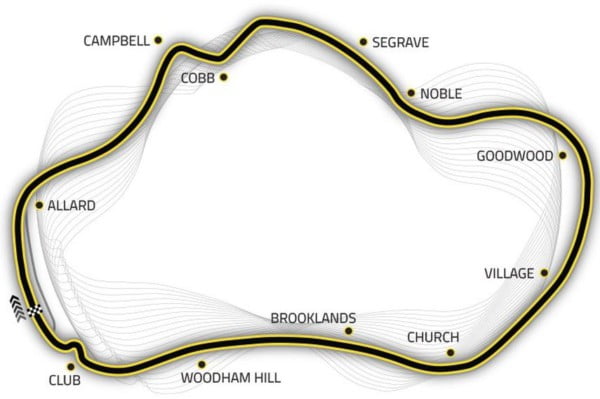
Thruxton, in Hampshire, is widely regarded as the fastest circuit in the UK. At 3.79 km, the track is built around sweeping high-speed sections and demands confidence, accuracy and commitment from every driver. Originally developed on a former airfield, it has a distinctive open feel and remains one of the most exhilarating venues on the British racing calendar.
Upcoming Events
.png.990d70352d6c924247f08e628aa0f8b4.png)

Thruxton has a reputation for a reason. It’s fast, committed and the kind of circuit that asks you to be brave in all the right places. When you get into a rhythm there, it feels brilliant, but it also has a way of reminding you very quickly if you’re not precise enough.
What makes Thruxton so special is the speed you carry through the lap. It rewards confidence, but not recklessness — you still have to be accurate, still have to place the car properly, and still have to think ahead because everything comes at you that bit quicker. On a circuit like this, commitment and discipline have to go hand in hand.
Mid-summer always feels like a key point in the season, and a venue like Thruxton has the potential to make it even more significant. It’s one I’m really excited about, because fast circuits always have their own kind of challenge and atmosphere. I think it should make for a brilliant weekend of racing.
If you’re following Team Tofty this year, let me know you’re watching by RSVPing — it would be brilliant to know who’s cheering us on from home.
What makes Thruxton so special is the speed you carry through the lap. It rewards confidence, but not recklessness — you still have to be accurate, still have to place the car properly, and still have to think ahead because everything comes at you that bit quicker. On a circuit like this, commitment and discipline have to go hand in hand.
Mid-summer always feels like a key point in the season, and a venue like Thruxton has the potential to make it even more significant. It’s one I’m really excited about, because fast circuits always have their own kind of challenge and atmosphere. I think it should make for a brilliant weekend of racing.
If you’re following Team Tofty this year, let me know you’re watching by RSVPing — it would be brilliant to know who’s cheering us on from home.